Showing posts with label animation drawings. Show all posts

Friday, October 6, 2017

And the 2017 24 Hours begins...


In past month, students have been preparing for this year's 24 Hours Animation Contest and have formed into teams. Each team has 5 students, some team members have been through the process before, while others are doing this for the first. Everyone is up for the challenge.

Each year this contest increases in size due to its popularity. Last year's contest in 2016 there were 27 schools participating and 124 teams or 620 students in competition. This year, there are 44 schools schools participating with 183 Teams completing or 915 students all working to complete a :30 second animated film based on the theme in 24 hours.
 

The 2017 Woodbury University 24 Hours animation teams gathered in the Design Center's D105 at 3pm. Great hordes of excited Sophomores, Juniors and Seniors gathered as timid,but curious Freshman stayed to watch. The live streaming announcement came from Aubry Mintz in his top secret classroom, hidden somewhere in Long Beach, CA.

The goal of the 24 hours contest is to create a 30 second animation piece from a theme which is announced at the beginning by 24 Hours. Aubry Mintz, Associate Professor at CSULB welcomes all the school's participating, thanks the sponsors who have donated prizes to the final top five winners and finally announces the theme of this year's 24 Hours contest.


This year's theme was announced by Mintz on Friday, Oct 6th at 3:30pm PST and is as follows.


The 24 HOURS 2017 THEME:

Is based on the Sesame Street song, " One of these things is not like the others."


Let the Brain Storming begin! 
And off they go in a wild giggle of animation students to find an area to work. Some are on Macs, others are on PCs and a few have taken over the Stop Motion studio. Snacks appear along with laptops, pencils and pens. Dry erase boards are suddenly filling up with thumbnail sketches, words, images and ideas are starting to be born.


The Creative process is alive tonight and everyone is working on turning this year's theme into their own unique vision. There are a variety of animation projects being produced from Traditional, to Digital and even stop motion.


But with great brain power comes food for thought. At around 9pm, Several pizzas were delivered. 


All the students took a quick dinner break and returned to a long night of animation ahead.

And into the night they work.

Next Post: The final WU films


Tuesday, January 5, 2016

Organizing your Animation work: Part 1


Ok, recently, I was going over how to do a Pose Test, having my students figure out their scenes by filling out X Sheets and adding timing charts to their animation Key drawings. Then putting all this information into a Scene Folder as if they were handing off their rough animation scenes to someone else to inbetween and clean up.

I talked about the process of pose to pose animation, but unless you actually prepare a Scene folder for yourself, its all just words in the air. And so, when I got all the scene folders back from my students, I could see that I needed to go over this process by reviewing the process in a little more detail.

Learning drawing animation takes time, patience and practice as well as learning from ones mistakes. And we work towards learning the animation principles to create a story that our audience will eventually see. However, there is another part of the animation process that Animators must learn in order to keep the process organized and moving toward to the final product.

This production work is the behind the scenes stuff that your audience will not see or even care about. The kind of stuff, 2D animation studios invented long ago to keep the work moving forward and under control as it went through the different production stages of Layout, Rough Animation, Clean Up and finally as the final Render

Here are a few things that you can do to keep the 2D Animation production processes alive and well. 

The Pose Test

As simple as this sounds, its very important that every Animator label their drawings in the same way to help keep everything consistent. Often Animators will do their rough posing to figure out the motion in the scene, jot down drawing numbers in the corner and then shoot a pose test to figure out the best timing. 

Shooting the Keys along with the missing inbetweens will show the Key poses popping from one pose to the next. This is a preview to the final action and an experienced Animator can tell how the scene will look once all the missing inbetweens have been added later.

The Animator will show his work to the Director who may have him revise something or approve it. The goal is to keep the Animator working on the animation as quickly as possible and the Animator's assistant is to help refine the Animator's roughs and figure out the Inbetweens. The Assistant will also fix up the drawing numbering, refine the timing charts and keep the character(s) on model throughout the scene.

Labelling Drawings

Let's start with a sheet of animation bond. After you have worked out some Key poses on several sheets, all Keys need to be circled to show they are the Key poses and not Breakdowns or the Inbetween drawings. Breakdowns should be underlined and you don't have to do anything to the Inbetweens.

As a team of 2D artists, everyone must keep their characters looking as if one person has drawn them, this is known keeping the drawings "on model", something that doesn't happen in 3D animation.

Here's a Milt Kalh drawing. You can see he has a timing chart in the upper right and a # 4 in the lower right corner. 

This is the animator's key frame which has been cleaned up by an assistant animator, notice cross register lines and the line across the bottom of the drawing. This might be the camera framing.

All animation drawings must be labeled with a letter and a number. So, if you draw a glass of water in your scene, don't write it as Glassofwater 1, rather shorten it a one letter; G1.
Sometimes you might have a scene that has a series of G drawings for other objects or the first letter of character's name in the scene. If you have a character named Gary who has to pick up a Glass of water which sits on a Glass table, you need to relabel each layer with a   second letter to show the difference, so G for Gary, W for Glass of water and T for Table.

Again as I write this, I think, isn't this obvious. Do I have to really write all this out? But as an animation instructor, I want my students to learn the right way to produce their animation and learn the process that makes sense

I've noticed that students will label their drawings as tiny as possible, some in the lower right hand corner of the paper as requested. But others, will lable in the lower left, upper right or upper left hand corner of the paper as well. If it was possible, they would label the edges of their paper.  

Back when the world was black and white, the drawings were labelled in the lower right for the cameraman see what drawings he was going to shoot on his Oxberry animation stand.
All the drawings were labelled the same to allow the cameraman to shoot them quickly and accurately in a dark room, under two hot movie lights aimed at the artwork below.
 
ALL DRAWINGS, even its only one, MUST BE LABELED IN THE LOWER RIGHT HAND CORNER OF THE PAPER. Big enough to view from a distance. Many students think this info will be seen on screen and either draw it very lightly or very, very small. These same students are in shock when it comes to drawing timing charts on their Keys.

Timing Charts

Timing Charts are the Animator's notes to the Inbetweener explaining how the inbetween drawings should be drawn from the Keys. Each Key has a timing chart on it with that Key number circled on top of the chart. Here are a few examples of the various timing charts and what they do.

The timing chart below shows the inbetween action as an "Ease In " or slowing down to stop at B9.
Here are two Timing charts, the first shows an "Ease Out" where B9's inbetweens are speeding up as it gets to B13. The second chart shows "Constant Motion" of B9 moving into B 25 position. Below are Keys B13 and B25. X1 is the arms holding the bat on a separate layer.


Notice the T/B B1 beside the character's left foot. This indicates a "Trace Back" where the assistant animator needs to redraw that foot exactly, so it doesn't slide around during the scene. Little notations like this are all over an Animator's drawings and are removed during the cleanup process.

Timing Charts need to make sense and are not sloppy.


But Wait, there's more!
Visit: Organizing your Animation work: Part 2!


If you learned something new, click on the ad to the right and the ad below this article, let us know you appreciate animation, Thanks!


Saturday, September 12, 2015

More Horn tooting

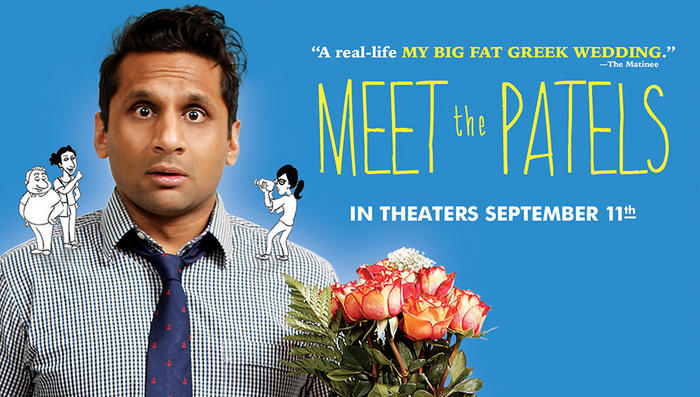
Meet the Patels is a documentary that I designed the animation for and is now in a theater near you. Here is a recent article, which mentions the animation. Visit the Meet the Patels website and support this film. Its really fun!


Here's an interview from WGN in Chicago! 


Saturday, May 2, 2015

My Animation is in this Documentary!

Well sort of...

Several years ago, I worked on creating character designs based on the real life family members in this documentary. In fact, if you go back to an earlier posting of this blog, you will see some of those early designs.

I came up with the designs with the understanding that I would create the storyboards, the animatic and eventually the final animation in the film. I could make my own documentary of this process, but it wouldn't be as enjoyable as the "Meet the Patels" documentary has finally become.

After 6 years of hard work and dedication, Ravi and Geeta have finally finished their epic about dating in the modern world from a traditional India perspective. Its a very fun and often touching look at the struggles of Ravi trying to find his sole mate, while his sister Geeta documents the process.

They have a Kickstarter campaign to get their film into the theaters nationwide, but they need your help asap. You can learn more by click on the photo of Ravi below!


We have 30 days to put Meet the Patels into theaters. Um, help?
https://www.kickstarter.com/projects/meetthepatels/help-us-get-meet-the-patels-into-theaters-this-aug 
Looks like Geeta and Ravi's film will finally get on the big screen and perhaps even at a theater near you! The Kickstarter funding was a success and if you ever get a chance to see it, here's the latest trailer!

http://trailers.apple.com/trailers/independent/meetthepatels/

UPDATE: You will get a chance to see the film in September which is not to be missed and worth the price of admission! If you have seen it, please let us know what you thought of it.

Thursday, October 9, 2014

You are the client! : Your Choice

Last Week, I invited everyone to pick one of 10 possible rough cartoon character designs. I promised not to mention any names, only which number got the most votes and asked, "Which Cartoon guy do you like and why? " The real Client already made their choice and Thanks for all the emails, Wow!

Ok, here are some of the results...
 Choice #   1  =   42 picks
 Choice #   2  =     5 picks
 Choice #   3  =     0 picks
 Choice #   4  =   28 picks
 Choice #   5  =   37 picks
 Choice #   6  =   13 picks
 Choice #   7  =   94 picks
 Choice #   8  = 138 picks
 Choice #   9  =   17 picks
 Choice # 10  =   12 picks

Thanks again to all 387 of you for sending in your choices. It was great to hear from all of you. One person chose the guy in the middle, under #4, which I completely forgot to give a number.

The real Client chose....


And as soon as I receive my first payment, I will clean up this choice and have a final design for the Client to approve. And so, as they say in France, " Le chèque est dans la poste !"

Friday, October 3, 2014

You are the Client!

Does this ever happen to you? You are working on your own project with a deadline you hope to reach when suddenly, an outside job opportunity comes along. Now you have to drop everything again and work on this other project, which is paying for your time and expertise.

Recently, a short commercial has driven up to my front door and needs my animation help. Its a small car commercial spot which involves two important things. 1) Design a cartoon version of an actual car dealer and 2) Animate the entire :30 spot in October.(ha!)

First, when starting a job you need to find out all the information you can about what they want, when is their deadline and how much will they pay. Once you have some of this info, you need to put together a bid or an estimate of how much time and labor it will take you to accomplish the project. I'm skipping over all this stuff since this is not a business blog and going right for the animation process stuffing.

I will mention that when I bid on this job, it was a totally different idea when my bid was approved. Luckily, even though its was a different idea altogether, the new idea was a lot simplier than the first, but does involve some character designs and rough storyboarding.

Most large studios or ad agencies have a storyboarded concept and character designs already to send off to the chosen animation studio. Smaller places don't.

The client sent me a photo of a real Car Deal guy, who I'm suppose to create a cartoon version of and so, experience has taught me to draw a bunch of rough ideas, number them and let the client decide which one they would like me to do more work on.

And now, You are the client!  
Your Deadline is Friday:10/10/14

Here are 10 possible cartoon characters, perhaps the next Homer Simpson! Which Cartoon guy do you like and if you can tell why? 
The real Client already made their choice, but I want to hear from you!!! You may send me a comment and let me know which number you like and I won't mention your name.  
Vote Early, Vote Often!  Submit by 10/10/14

Wednesday, August 27, 2014

Big Animation Events coming in September!

If you want to learn more about the history of animation and live in the Los Angeles area, there are a lot of Animation events happening in September.


On September 13th!
The Academy of Motion Picture Arts and Sciences will be presenting 3 animation events starting at 5pm:

GERTIE THE DINOSAUR AND THE BIRTH OF PERSONALITY ANIMATION!

John Canemaker will present a lecture about Winsor McCay, creator of Gertie the Dinosaur and the making of his 1914 classic, Gertie the Dinosaur.
 McCay drew 10,000 drawings to create Gertie the Dinosaur, 1914 which were all drawn on one level, no cels were used.

Then at 7:30pm

You will learn about THE LOST NOTEBOOK: HERMAN SCHULTHEIS AND THE SECRETS OF WALT DISNEY'S MOVIE MAGIC

And Finally at 8:45pm
A Screening of Walt Disney's Fantasia!
For tickets and info, click the link below...

Animation Masters: John Canemaker Celebrates Winsor McCay and Walt Disney | Events Presented by the Academy of Motion Picture Arts and Sciences

Sept 21: Chuck Jones 102gether! held at the Alex Theater in Glendale at 3pm.
Then on September 13th!
The Academy of Motion Picture Arts and Sciences will be presenting 3 animation events starting at 5pm:

And if you are an animation student wishing you could be apart of an animation production, here's a  the 24 HOUR Animation Contest. There may be time to enter your school, so check it out!


Aubry Mintz has been running a 24 hour animation contest for the past 7 years and has had excellent results and responses from our industry sponsors, including CTNX, Disney, DreamWorks, Nickelodeon, ToonBoom, DigiCel and more!

Last year with 50 teams (250 students) from 11 schools participating it was the largest one yet! This contest teaches students about working together, meeting deadlines and making creative decisions under pressure. Although it is quite a bit to do in such a short time, every year we always have completed, colored films!!! AND they all have a lot of fun and return for more each year!

Please send these attached fliers out to your student/clubs and please let me know if we can expect participation from your school and I will add your schools name to our list and email group. 


This year the contest will take place on Friday September 26th at 5pm PST to Saturday September 27th at 5pm. At Friday at 5pm, the theme of the contest is announced and each group takes some time to come up with an short animated idea based on the theme. 

I will be there from the beginning and attempt to document some of the productions which will be coming out of Woodbury University's Animation Teams. Check back to see what happens and view the final student films!


If you know of any future animation events, please let me know.

Tuesday, July 1, 2014

"Meet the Patels" Character designs

Sometimes when you work in the world of freelance, you'll work on a project that will never see the light of day. Hopefully, you are paid for your time and have a sample of your hard work, but for some unknown reason, the project is never completed.

Luckily this time, a project I worked on is finally finished and here's a link to "Meet the Patels." This film took 6 years to make, but the filmmakers stuck to their goal and it premiered at the Hot Docs film festival in Toronto where it was voted #2 favorite audience choice. I recently saw the film at the Los Angeles Film Festival and was happy to hear the response of the audience. Here's a clip of the animation from the film.

My involvement with the project was to create character designs of the real family members as animated characters for the documentary. It took some time to design each character and to find a way to make a style that related to one another. I think the best way to do this is to start with the main character and draw a lot of different designs based on that character. I first did a lot of drawings, trying out different styles and trying to find a fun cartoon style. These were usually done to find the style that I liked and could refine.


 Then I took a batch of designs and labeled each one A, B, C, etc. to show Ravi and Geeta. From their comments, I would be able to refine the character designs to fit the style of the film. Here are the final character designs.

I learned a lot about character designing during this project and I think I did the best I could to do doing my part of the job. If you get a chance to see this film, its a very good film and if I hear more about it, I will add to this post.

Thursday, April 24, 2014

Lip Sync Animation


Lip sync animation was always a mysterious process for me when I was learning how to do it and my only guide was this famous Preston Blair book. This book contains a section showing the generic cartoon mouth shapes and the sounds that matched. Several sounds could share the same mouth shape, like a closed mouth could be used during an M, B or P sound.

Later, I got to read a sound track on an old school Steinbeck flat bed editor. This oven sized editing machine could play sound and picture together and was used to cut something called film, centuries ago. My task was to sit down on this beast, scroll thru the sound very slowly and breakdown the sounds unto the exposure sheet. Today, I do the same task using ToonBoom Animate Pro or Storyboard.

The more you do, the better you get and I discovered that you don't want your mouth position changing every frame. Its ok to have one position overlap a frame, because it will look more natural. It will not draw your attention to the speed of the mouth if its on two's, unless you have a character who is very fast and you want to show that in his speech pattern as well.

Breaking down the soundtrack is a process which is the same for both 2D and 3D animation and it will take sometime to do. Sometimes, I would have play as sound forward and backward to find where a the word started or  ended. A weird thing I picked up while track reading was that the word "Yes", when played backwards will sound like "Say". And its better to read dialogue instead of having it with sound effects and music on the same track.

So, if I had a recorded line of a character's voice saying, "I will go..." I would listen to the take a few times and get an idea behind the performance. Then I would listen to the track very slowly, by scrubbing thru the sound file to see how long each word takes to say in frames.

The word "I" is made up of two sounds, "Ah" and "Ye". Said quickly or slowly, "I" could cover 2 to 6 frames of sound. An exposure sheet is incredibly useful in 2D animation and is necessary in writing down all the dialogue breakdown information. Here is an example of breakdown dialogue on an exposure sheet. Can you understand what is being said phonetically?

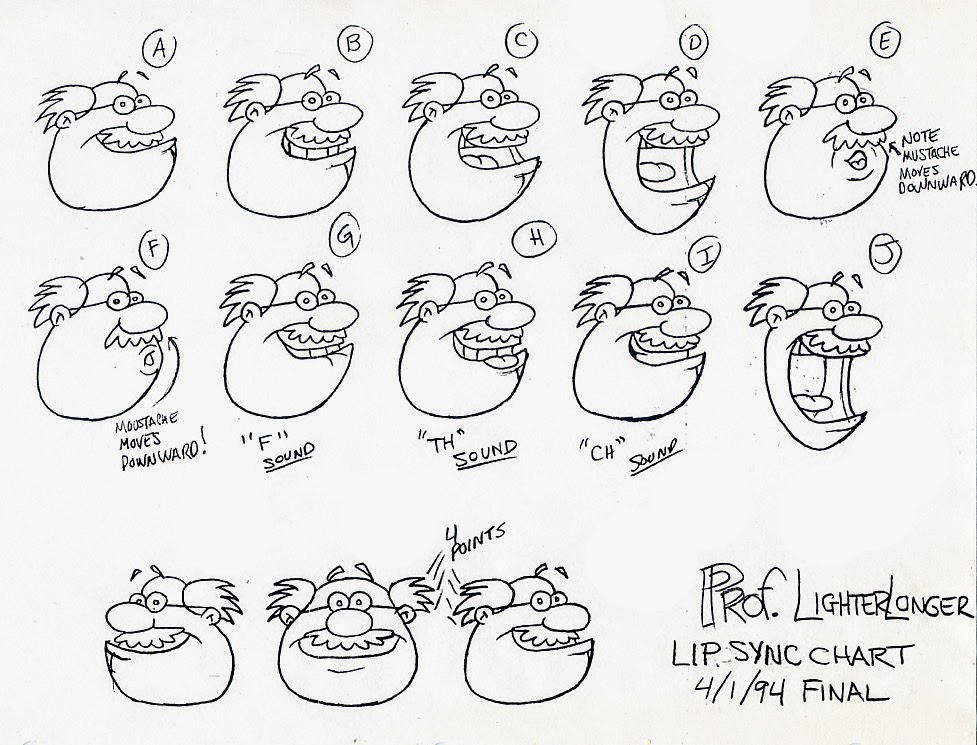
Here's a standard mouth chart used in Animaniacs. Notice how mouth H is similar to mouth C, except for the tongue placement. Also "Y" mouth is an inbetween of mouth B and mouth C, allowing a smoother transition from B to C.  


Here are several Mouth charts for various characters from Animaniacs. These mouth positions were labelled on the X-sheets, so the animators knew what mouth to draw at which frame.

Below is a more snobby type character. Notice the differences in mouth design.


All of the above mouth charts are shown to be from a happy expression, but what if you have a character that goes from happy or sad or mad? I had a character who was a sarcastic bully and so my mouth chart shows happy mouths with angry mouths...

Below is a mouth chart of a friendlier character.
I was recently cleaning out my garage and can across some of my animation past. The above two mouth charts are from a video I designed and directed for the ThinkFirst Foundation. It was a short video teaching kids about spinal safety. The script was written by Jim Hardison and produced the video through his company called Image Dynamics in Chicago. I was hired to direct the animation. I found a production notebook full of modelsheets, color info, props and other things which brought back a lot of memories, good and bad.

If you learned something new, click on the ad to the right and the ad below this article, let us know you appreciate animation Thank You!